launch x431 Tool

Customer Questions & Answers

1
votes
Question:
Q:Will this work with Launch X431 PRO Elite (X431 PROS Elite)???
Answer:
A:Sorry, not supported.
Launch X431 PRO Elite/ PROS ELITE not support TPMS function.
By Susan Seller on Apr 15, 2024 1 of 1 found this helpful. Do you?

1 Votes
1
votes
Question:
Q:Hello, does it compaitable with Launch PAD VII?
Answer:
A:Yes, it supports.
By Susan Seller on Apr 10, 2024 1 of 1 found this helpful. Do you?

1 Votes
1
votes
Question:
Q:Hello from greece. If you send it to greece.i pay tax? (customs) or you send it from warehouse Europe? Thanks
Answer:
A:Hello friend
Have a nice day, this item is new arrivals, it is in China only now
If you need eu ship, would you like to choose this one
https://www.eobdtool.co.uk/wholesale/launch-x431-tsgun.html
It is in Czech Republic warehouse ready to ship, we can ship it from CZ to you no tax
By Susan Seller on Jan 28, 2024 1 of 1 found this helpful. Do you?

1 Votes
0
votes
Question:
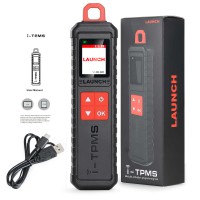
Q:What to do if my i-TPMS encountered some unexpected bugs?
Answer:
A:In this case, a firmware upgrade is required. On the TPMS version selection screen, tap Firmware Update to upgrade it.
By Susan Seller on Dec 10, 2024 0 of 0 found this helpful. Do you?

0 Votes
0
votes
Question:
Q:My i-TPMS can not trigger sensor.
Answer:
A:Please check the following:
1. Whether the device is damaged or defective.
2. Whether the sensor, module or ECU itself may be damaged or defective.
3. The vehicle does not have a sensor even though a metal valve stem is present. Be aware of Schrader rubber style snap-in stems used on TPMS systems.
4. You device may require a firmware upgrade
By Susan Seller on Dec 10, 2024 0 of 0 found this helpful. Do you?
0 Votes
0
votes
Question:
Q:Why does my i-TPMS automatically power off?
Answer:
A:Please check the following:
1. Whether the device is fully discharged.
2. If the device is not being charged and there is no operation on the device for 30 minutes, it will automatically power off to conserve battery power.
By Susan Seller on Dec 10, 2024 0 of 0 found this helpful. Do you?

0 Votes
0
votes
Question:
Q:My i-TPMS does not respond?
Answer:
A:In this case, please carefully check the following:
1. Whether the device is successfully connected to the diagnostic tool/smartphone wirelessly
2. Whether the device is powered on.
3. Whether the device is damaged or defective.
By Susan Seller on Dec 10, 2024 0 of 0 found this helpful. Do you?

0 Votes
0
votes
Question:
Q:Can I set the system language of my iTPMS?
Answer:
A:It varies with the system language of the diagnostic tool/smartphone that connects it. Currently only English and simplified Chinese are available on the device.
If the device detects the system language of the diagnostic tool/smartphone is nonChinese, it will change into English automatically no matter which language the diagnostic tool/smartphone is set as.
Launch i-TPMS Support Language: Device language: English and Chinese
i-TPMS App language: Chinese, English, Italian, French, Russian, Spanish, German, Polish, Korean, Japanese, Portuguese, Arabic
[When the app software switches to Chinese, the device will also display Chinese simultaneously. Except for Chinese, the device will all display English. ]
By Susan Seller on Dec 10, 2024 0 of 0 found this helpful. Do you?

0 Votes
0
votes
Question:
Q:Why does my i-TPMS always stay on welcome screen?
Answer:
A:If the device keeps displaying the welcome screen, it indicates that it is not in TPMS function mode. If the diagnostic tool is performing the TPMS function, the device will switch to the corresponding function mode.
By Susan Seller on Dec 10, 2024 0 of 0 found this helpful. Do you?

0 Votes
Total 9 items, 20 items/p, current page 1/1.
Don't see the answer you're looking for? Post your question